Advanced Configuration
For users requiring more control over the synthesis process, bmquilting provides advanced class methods for both SquarePatchingConfig and CircularPatchingConfig. These allow for granular configuration of patch searching, seam computations, and blending behaviours.
2. Square Patching Only Advanced Options
The following options are available solely for SquarePatchingConfig.advanced.
Options for Patch Searching
match_template_method: The method used by match template.
cv2.TM_SQDIFF(Default): Squared difference matching.cv2.TM_CCOEFF_NORMED: Correlation coefficient matching.
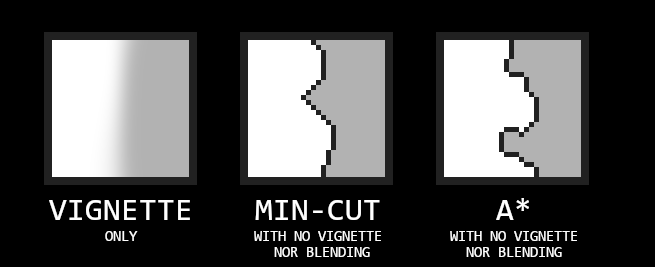
vignette_on_match_template: If True, applies an adjusted blending vignette as a weight mask during the patch search.
The diagram below illustrates its relation to the blending vignette.

Options for Seam Computation
seam_algorithm: Defines the algorithm used for seam computation.
SeamsAlgorithm.ASTAR(Default): Uses A* to find the optimal seam. It can backtrack and handle complex overlaps.SeamsAlgorithm.MIN_CUT: A strict one‑direction seam strategy that forbids sideways shifts or backward steps.SeamsAlgorithm.NONE: Bypasses seam computation entirely (useful when only feathering is desired).
Additional Blending Config Option
When use_blur_radii_guess_pathfind_limiter is enabled (True by default), a heuristic constrains the seam search region on a per-patch basis. Patches with higher error values are assigned a narrower search area. This reduces blur artefacts without relying on use_blur_radii_limiter.
Unlike the pathfinding limiter, use_blur_radii_limiter does not affect the seam search space. Instead, it limits the effective blur radii based on proximity to the patch edges. This can result in blur not being applied in regions where it would otherwise be appropriate, if those regions fall too close to the patch boundaries.
Restricting seam search based on error can be counterproductive if it forces the seam through portions of the overlap that are not visually coherent.
3. Circular Patching Only Advanced Options
The following options are available solely for CircularPatchingConfig.advanced.
A* Variants
AstarVariant.DEFAULT: Standard A*.AstarVariant.ORTHO_Y: A* using pyastar2d’s experimentalORTHOGONAL_Yheuristic — “moves by y first, then halfway by x”.AstarVariant.NONE: No seams computed (useful when only feathering is desired).
Specialized Matching
outer_corners_weighted_template_matching: If True, weights the template matching to prioritise the outer corners of the annulus.
The current implementation uses the outer corners of the partial annulus as fixed endpoints to maximise the non-overlapping area.
Using a “free corridor” to utilise arbitrary endpoints (similar to the strategy used with square patches) is a viable alternative, but it is not currently supported.
Because the endpoints are fixed at the corners, the seam is restricted in its movement. If there is a high degree of error near these endpoints, the algorithm may be forced to route the seam through the least optimal area.
To minimise this, the area near the endpoints can be weighted more heavily during template matching. This ensures that the selected patch provides a stable fit where it matters most, allowing for a smoother transition at critical junction points.
The diagram below shows how the template matching mask is constructed and how it relates to this potential scenario.

Example: Advanced Configurations
Square Advanced
from bmquilting.square import SquarePatchingConfig, SeamsAlgorithm, SquarePatchingBlendConfig
import cv2

# Create a custom blend config
blend_cfg = SquarePatchingBlendConfig(
    min_blur_diameter=3,
    max_blur_diameter=15,
    use_vignette=True
)

# Initialize with advanced options
config = SquarePatchingConfig.advanced(
    block_size=64,
    overlap=16,
    tolerance=0.05,
    blend_config=blend_cfg,
    seam_algorithm=SeamsAlgorithm.MIN_CUT,
    match_template_method=cv2.TM_SQDIFF
)
Circular Advanced
from bmquilting.circular import CircularPatchingConfig, AstarVariant
from bmquilting import BlendConfig

blend_cfg = BlendConfig.auto_blend_config_2(block_size=65, overlap=32, use_vignette=False)

config = CircularPatchingConfig.advanced(
    diameter=65,
    overlap_ratio=0.5,
    tolerance=0.1,
    spacing_factor=1.12,
    blend_config=blend_cfg,
    a_star_variant=AstarVariant.ORTHO_Y
)