Parallelisation
The main strategy employed for parallelisation is a radially structured generation approach, starting from the centre, which aims to divide the generation into independent regions.
This optimisation was not implemented for all methods that could benefit from it. The methods that utilise it are mentioned in this section.
When to use Parallelisation
Unfortunately, relying on multiple processes doesn’t always guarantee a speed-up; it can, sometimes, even make the synthesis slower.
Prefer to rely on parallelisation when dealing with high resolution images or large generations for which the multi-process overhead is negligible.
For texture generation using Square Patches
from bmquilting.square import generate_texture_parallel
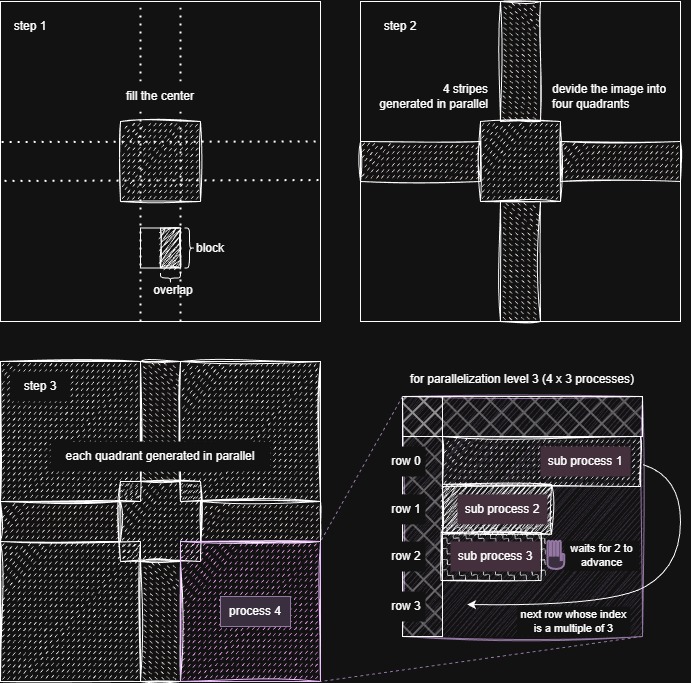
The generation process, illustrated in the image above, is composed of the following four steps:
Centre: The centre of the texture is patched using the standard, non-parallel algorithm. This is performed to ensure there are no areas common to the processes running in subsequent steps.
Stripes: Two horizontal and two vertical stripes are generated in parallel (four processes), starting from the centre patched area.
Quadrants: Each of the four quadrants is filled independently, in a separate process.
Sub-Parallelism: If the
nps(Number of Parallel Stripes) is greater than 1, multiple stripes are computed in parallel within each quadrant. Because a stripe requires the previous one to be at least one block ahead, coordination between processes causes overhead; therefore, it is recommended to utilisenpshigher than 1 only for larger generations.
Note
A minimum nps of 1 always starts four processes, one per quadrant.
For Texture generation using Circular Patches
from bmquilting.circular import generate_cphl6p, generate_cphl6p_guided
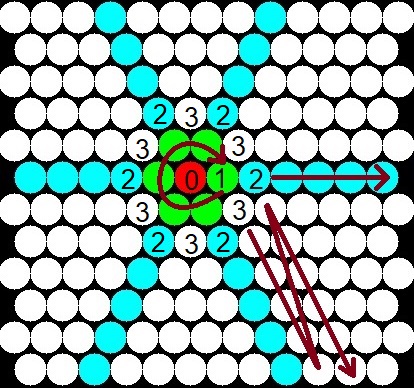
The generation process, illustrated in the image above, is composed of the following five steps:
Centre: A random patch is selected for the centre of the texture.
Immediate Neighbours: The six immediate neighbours around the centre are patched sequentially.
Directions: Six directional batches (rays from the centre) are generated in parallel (up to six processes).
Sectors: Six sector batches (the areas between the rays) are filled in parallel (up to six processes).
(NOT IMPLEMENTED) Similarly to the square patches variant, the hexagonal “stripes” could be processed in parallel.
Note
The n_processes parameter indicates the number of parallel processes to be run. The maximum value for n_processes is six, corresponding to the maximum number of directions and sectors that can be computed simultaneously.